
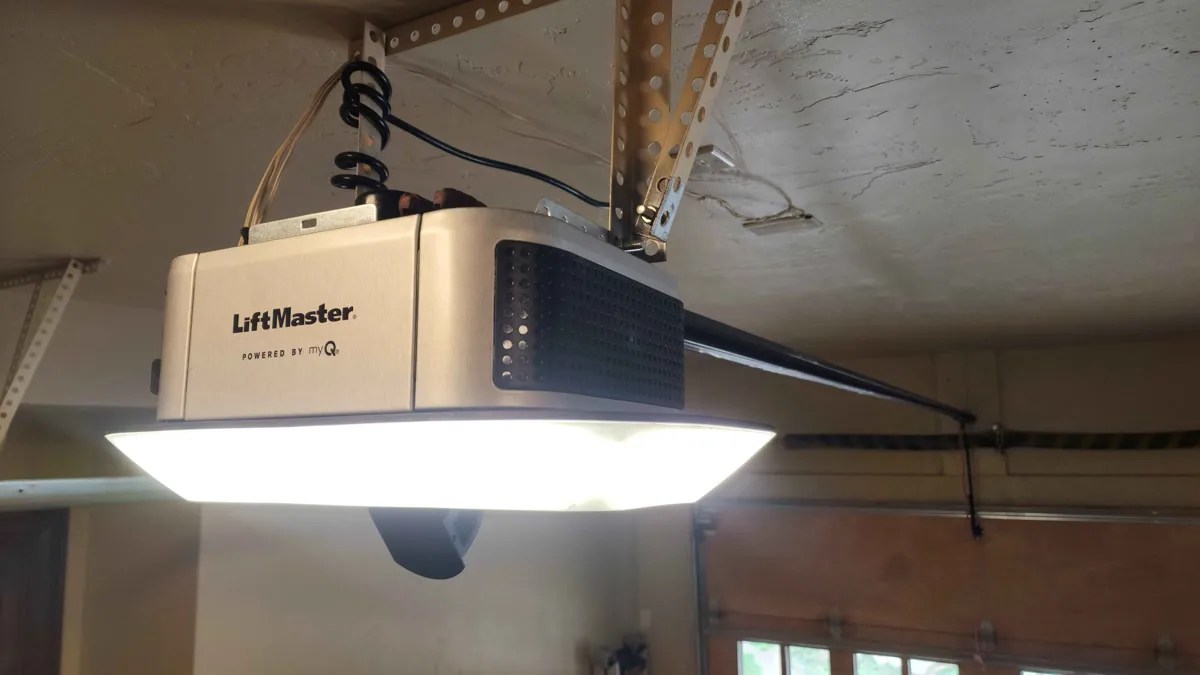
If your myQ app is not working, the most common fix is power cycling your opener and router, confirming your WiFi is 2.4 GHz (not 5 GHz), and reinstalling the myQ app. Advanced Door is Utah’s #1 rated garage door company – family owned since 1994 with the only lifetime warranty on parts and labor in the state. If your myQ troubleshooting leads to an opener that needs professional service, call (844) 971-3667 for same-day help across Utah.
Last updated: August 2026
Table of Contents
- What Is myQ and How Does It Work?
- myQ Quick Diagnostic: What Is Going Wrong?
- myQ Won’t Connect to WiFi
- myQ App Errors and Connection Problems
- myQ Shows Wrong Door Status (Sensor Issues)
- myQ Hub and Bridge LED Codes and Troubleshooting
- myQ Smart Home Integration Issues
- myQ Camera Troubleshooting
- myQ After a Power Outage or Internet Outage
- LiftMaster vs. Chamberlain myQ: Key Differences
- When myQ Problems Mean Your Opener Needs Service
- myQ Repair and Service Cost Guide
- Utah-Specific myQ Challenges
- 7 Common myQ Mistakes
- Frequently Asked Questions
What Is myQ and How Does It Work?
myQ is a smart garage door platform built by the Chamberlain Group, the parent company behind both LiftMaster and Chamberlain garage door openers. It lets you monitor and control your garage door from anywhere using a smartphone app.
The system works through a connection chain: your garage door opener communicates with your home WiFi router, which connects to Chamberlain’s cloud servers, which relay commands to the myQ app on your phone. When any link in that chain breaks, problems follow.
myQ comes in two forms:
- Built-in myQ: Newer LiftMaster and Chamberlain openers (roughly 2017 and later) have WiFi and myQ technology built directly into the motor unit. No extra hardware needed.
- myQ Smart Garage Hub (MYQ-G0401): A small add-on device that brings myQ capability to older compatible openers. It connects to your WiFi and communicates with a door sensor mounted on the door itself.
Understanding which version you have matters for troubleshooting because the fix for a built-in myQ opener differs from a hub-based setup.
Pro Tip
Check your opener’s model number on the back or side of the motor unit. LiftMaster models starting with 84, 85, 87, or 89 (like the 84501, 8550W, 87504) have built-in myQ. If your opener is older or a different brand, you are likely using the myQ Smart Garage Hub.
myQ Quick Diagnostic: What Is Going Wrong?
Before diving into detailed fixes, use this diagnostic table to identify your specific myQ problem and jump to the right section.
| Symptom | Likely Cause | Section |
|---|---|---|
| App says “Offline” or “Unable to connect” | WiFi connection lost | WiFi Issues |
| App crashes or shows error codes | App software issue | App Errors |
| App shows door open when it is closed | Sensor misalignment or battery | Sensor Issues |
| Hub LED blinking amber or no light | Hub not connected or no power | Hub Troubleshooting |
| Alexa, Google, or HomeKit won’t work | Integration blocked or misconfigured | Smart Home Issues |
| Camera shows no video or black screen | Camera setup, bandwidth, or subscription | Camera Issues |
| myQ stopped working after power outage | Opener or router lost connection | Power Outage |
| App sends command but door does not move | Opener hardware issue | Opener Problems |
| Cannot set up myQ for the first time | WiFi settings or app setup error | WiFi Issues |
| Notifications delayed or not arriving | App permissions or phone settings | App Errors |
myQ Won’t Connect to WiFi
WiFi connectivity is the single most common myQ problem. The platform relies entirely on your home WiFi to function, and garages are notoriously difficult environments for wireless signals. Here is a systematic approach to fixing myQ WiFi issues.
Confirm You Are Using 2.4 GHz (Not 5 GHz)
This is the number one cause of myQ connection failures. All myQ devices – including built-in WiFi openers and the Smart Garage Hub – only work on 2.4 GHz WiFi networks. They cannot connect to 5 GHz bands.
Many modern routers broadcast a single network name that automatically switches devices between 2.4 GHz and 5 GHz bands (“band steering”). This can cause myQ to intermittently lose its connection. The fix is to create a separate 2.4 GHz network name specifically for your myQ devices, or disable band steering in your router settings.
Action Step
Log into your router’s admin panel (usually 192.168.1.1 or 192.168.0.1). Look for wireless settings and confirm you have a dedicated 2.4 GHz network. If your router combines both bands under one name, either split them into separate SSIDs or check if your router has a “device steering” option you can disable for the myQ device.
Check Signal Strength in the Garage
Garages are WiFi dead zones for a reason. Metal garage doors act as signal reflectors, concrete walls block radio waves, and the distance from your router often puts the garage at the edge of coverage. Here is how to check and improve your signal:
- Test with your phone. Stand next to your opener and check your phone’s WiFi signal. If you have fewer than 2 bars, your myQ is struggling too.
- Use a WiFi analyzer app. Free apps like WiFi Analyzer (Android) or the built-in WiFi diagnostics on iPhone can show your actual signal strength in decibels. You need at least -65 dBm for reliable myQ operation. Below -75 dBm, connections will drop frequently.
- Consider a WiFi extender or mesh node. Placing a WiFi extender or mesh satellite in or near the garage is often the permanent fix. Mount it on the garage-side wall of your house for best results.
- Reposition your router. If your router is on the opposite side of the house from the garage, even a small repositioning toward the center of your home can improve garage signal dramatically.
Verify Network Settings
myQ has specific network requirements that can trip up even tech-savvy homeowners:
- Network name (SSID): Must be under 32 characters. Avoid special characters like ampersands, quotes, or exclamation marks in both the network name and password.
- Security type: WPA2-Personal (AES) is recommended. myQ does not support WPA3-only networks or open (unsecured) networks.
- DHCP: Must be enabled on your router (this is the default for most home routers).
- MAC filtering: If you have MAC address filtering enabled on your router, you need to add your myQ device’s MAC address to the allowed list. Find the MAC address in the myQ app under device settings or on a sticker on the hub.
- Guest network isolation: Do not put myQ on a guest network that has client isolation enabled. The device needs to communicate freely with the cloud.
Power Cycle Everything (The Right Way)
A proper power cycle fixes most intermittent myQ WiFi issues. Follow this exact sequence:
- Unplug your WiFi router and modem. Wait 30 seconds.
- Plug the modem back in first. Wait until all lights are solid (usually 1-2 minutes).
- Plug the router back in. Wait until it fully boots (another 1-2 minutes).
- For a myQ hub: unplug it, wait 10 seconds, plug it back in.
- For a built-in myQ opener: press and hold the “Learn” or “Program” button for 6 seconds until the WiFi LED blinks, then release. This restarts the WiFi module without resetting your programmed remotes.
- Open the myQ app and wait up to 5 minutes for the device to reconnect.
Pro Tip
The order matters. Restarting the router first ensures the network is ready before the myQ device tries to connect. Starting in the wrong order forces the myQ device to attempt connections to a network that is not yet available, which can cause it to enter a retry loop that takes 10-15 minutes to resolve.
myQ App Errors and Connection Problems
Sometimes the opener and WiFi are fine, but the myQ app itself causes trouble. Here are the most common app-side issues and their fixes.
“Unable to Connect” or “Offline” Status
If the app shows your device as offline but your WiFi is working normally:
- Force close and reopen the app. On iPhone, swipe up from the bottom and swipe the myQ app away. On Android, go to Settings, then Apps, then myQ, and tap Force Stop.
- Check for app updates. An outdated app version can lose compatibility with Chamberlain’s servers. Update to the latest version from the App Store or Google Play.
- Check Chamberlain’s server status. myQ relies on cloud servers. When those servers go down, everyone’s myQ stops working simultaneously. Search “myQ server status” or check Downdetector for current outage reports.
- Log out and log back in. This refreshes your authentication token, which can expire or become corrupted.
- Delete and reinstall the app. This clears any corrupted cache files. You will need to log back in but will not lose your device settings.
Notifications Not Working
If you are not receiving open/close alerts:
- Check phone notification permissions. Go to your phone’s settings and confirm the myQ app has notification permissions enabled. On iPhone, also verify that notifications are not set to “Deliver Quietly.”
- Check in-app notification settings. Open the myQ app, go to your device settings, and verify that alerts for door open, door closed, and door left open are all enabled.
- Disable battery optimization for myQ. Android phones aggressively kill background apps to save battery. Go to Settings, then Battery, then Battery Optimization, and set myQ to “Not Optimized” or “Unrestricted.”
- Check Do Not Disturb. Both iPhone and Android can silently block notifications during scheduled quiet hours.
Door Status Shows “Unknown”
A “door state unknown” message usually means the app can reach your opener’s WiFi module but cannot determine whether the door is open or closed. This typically points to a sensor issue rather than an app issue. See the sensor troubleshooting section below.
myQ Shows Wrong Door Status (Sensor Issues)
One of the most frustrating myQ problems is when the app shows your door as open when it is actually closed, or vice versa. This is almost always a sensor problem, not a WiFi or app issue.
Understand Your Sensor Type
myQ uses two different sensor technologies depending on your setup:
- Tilt sensor (myQ Hub setups): A small wireless sensor mounted on the top panel of the garage door. It uses gravity and an internal accelerometer to detect whether the door is horizontal (open) or vertical (closed). Runs on a CR2450 coin cell battery.
- Wired position sensor (built-in myQ openers): A sensor wired directly to the opener that monitors the door’s position through the opener’s internal logic. No battery needed.
Fixing Tilt Sensor Problems (Hub Setups)
- Replace the battery. This is the most common fix. The CR2450 battery typically lasts 2-3 years. When it weakens, the sensor sends intermittent or incorrect readings. Replace it proactively every 2 years.
- Check sensor placement. The tilt sensor must be mounted horizontally on the top panel of the garage door, not on the second panel or on a vertical surface. It should be within 4 inches of the top edge and centered on the panel.
- Clean the sensor. Garage dust and grime can accumulate on the sensor. Wipe it with a dry cloth.
- Check for magnetic interference. Rare, but strong magnets or certain door reinforcement hardware near the sensor can throw off its accelerometer. Move the sensor at least 6 inches away from any metal brackets or magnetic sources.
Action Step
After replacing the tilt sensor battery, open and close the door twice using the wall button (not the app). This recalibrates the sensor and syncs its position data with the myQ system. Check the app after both cycles to confirm the status reads correctly.
Fixing Wired Sensor Problems (Built-In myQ)
If you have a newer LiftMaster or Chamberlain with built-in myQ and the door status is wrong:
- Check the travel limits. If your opener’s travel limits are slightly off, the opener may think the door is not fully closed when it actually is. This confuses the myQ status display.
- Run a full close-open-close cycle. Use the wall button to close the door completely, open it completely, then close it again. This lets the opener recalibrate its position tracking.
- Check for limit switch issues. The internal limit switches tell the opener where “fully open” and “fully closed” positions are. If these are drifting, both the physical door behavior and the myQ status will be wrong. See our travel limit adjustment guide for step-by-step instructions.
myQ Hub and Bridge LED Codes and Troubleshooting
If you are using the myQ Smart Garage Hub (MYQ-G0401) or the older myQ Home Bridge (MYQ-G0303), the LED light on the front tells you exactly what is happening. Here is what each status means.
myQ Smart Garage Hub LED Codes
- Solid blue: Connected to WiFi and Chamberlain’s cloud. Everything is working normally.
- Blinking blue: Attempting to connect to WiFi. If it blinks for more than 2 minutes, there is a WiFi issue. See the WiFi troubleshooting section.
- Solid green: In setup mode and ready to be configured through the app.
- Blinking green: Communicating with the door sensor during setup.
- Blinking amber (yellow): WiFi connection failed. The hub cannot reach your router. Check your network settings, signal strength, and router status.
- Solid amber: Firmware update in progress. Do not unplug the hub during this state.
- No light: No power. Check the outlet, try a different outlet, and inspect the power adapter.
When to Factory Reset Your Hub
A factory reset should be your last resort. It erases all settings and you will need to set up the hub from scratch. But if the hub is stuck in a blinking state and nothing else works:
- Unplug the hub from power.
- Press and hold the setup button on the side of the hub.
- While holding the button, plug the hub back in.
- Keep holding the button for about 10 seconds until the LED turns solid green.
- Release the button and set up the hub again through the myQ app as if it were brand new.
Pro Tip
Before factory resetting your hub, take a screenshot of your myQ device settings in the app. This saves you from having to remember your configuration. Also note which outlet the hub is plugged into – the hub needs to be within about 8 feet of the opener for reliable communication and within range of your WiFi.
myQ Smart Home Integration Issues
Connecting myQ to your smart home ecosystem has become more complicated since Chamberlain Group changed their policies. Here is the current state of myQ integrations and how to troubleshoot each one.
Amazon Alexa
myQ works with Alexa through the official myQ skill. You can check door status, receive alerts, and control the door with voice commands (opening requires a spoken PIN for security).
If Alexa integration stops working:
- Disable and re-enable the myQ skill in the Alexa app.
- Relink your myQ account in Alexa’s smart home settings.
- Make sure both the myQ app and Alexa app are updated to the latest versions.
- Restart your Alexa device.
Google Home
Google Home integration works through the myQ action. You can ask Google about your door’s status and control it with voice commands.
If Google Home integration stops working, unlink and relink the myQ service in the Google Home app. Then say “Hey Google, sync my devices.”
Apple HomeKit
HomeKit integration requires the myQ Home Bridge (MYQ-G0303) or a newer built-in myQ opener that supports HomeKit natively. If your HomeKit connection drops:
- Check that the Home Bridge has power and shows a solid status light.
- Restart your Apple Home hub (Apple TV, HomePod, or iPad).
- Remove the garage door from the Home app and re-add it by scanning the HomeKit code on the Home Bridge.
The Third-Party API Lockout (Important Context)
In late 2023, Chamberlain Group officially blocked all unauthorized third-party access to the myQ API. This means:
- Home Assistant: The official myQ integration no longer works. Many smart home enthusiasts have switched to Ratgdo, an open-source hardware device that connects directly to the opener’s logic board and provides local control without relying on Chamberlain’s cloud servers.
- IFTTT: The myQ IFTTT service was removed in 2024. Automations that relied on IFTTT triggers no longer function.
- SmartThings: No official myQ integration exists for Samsung SmartThings.
- Custom apps and scripts: Any custom integration that relied on the myQ API will no longer work.
If you relied on one of these blocked integrations, your main options are:
- Use only official integrations (Alexa, Google Home, Apple HomeKit).
- Install a Ratgdo device for local control through Home Assistant or other platforms.
- Upgrade to a smart opener with broader native integration support.
Utah Note
Utah has a large smart home community, especially along the Wasatch Front’s tech corridor. If you use Home Assistant, Hubitat, or other advanced platforms and need reliable garage door automation, ask us about opener options that support local control natively. Call (844) 971-3667 and we can recommend the right setup for your system.
myQ Camera Troubleshooting
The myQ Smart Garage Camera and the myQ Video Keypad add video monitoring to your garage door setup. When video stops working, here is how to fix it.
No Video Feed or Black Screen
- Check WiFi bandwidth. Video streaming requires significantly more bandwidth than door control commands. If your garage WiFi is marginal for basic myQ operation, it will not support video. You need a strong, stable 2.4 GHz signal specifically for the camera.
- Power cycle the camera. Unplug it for 30 seconds, then plug it back in. Wait 2-3 minutes for it to fully reconnect.
- Clean the lens. Garage dust, cobwebs, and condensation can obscure the camera. Wipe the lens with a soft, dry cloth.
- Check your subscription status. Some advanced camera features (like video history and event recording) require an active myQ subscription. Live view should work without a subscription, but verify your account status in the app.
Night Vision Issues
If the camera’s night vision produces washed-out or unusable images:
- Check for reflective surfaces near the camera that could bounce infrared light back into the lens.
- Make sure the camera is not pointed directly at a white or shiny surface (like the inside of a metal garage door).
- Adjust the camera angle slightly downward to capture more of the garage floor and less of the door surface.
myQ After a Power Outage or Internet Outage
Power and internet outages are common in Utah, especially during summer monsoon storms and winter weather events. When the power comes back, your myQ system may not automatically reconnect. Here is the recovery sequence.
Step-by-Step Recovery
- Wait for your internet to fully restore. After a power outage, your modem and router can take 5-10 minutes to fully reconnect to your ISP. Do not troubleshoot myQ until you can browse the internet on your phone using your home WiFi.
- Check the opener. Verify that your garage door opener has power and the lights respond when you press the wall button. If the opener has no power, check the outlet, the GFCI circuit, and your breaker panel.
- Check the myQ hub (if applicable). The hub should show a solid blue LED once it reconnects. If it is blinking amber, it cannot find your WiFi network. See the hub troubleshooting section.
- Open the myQ app. Give it up to 5 minutes to refresh and show your door’s current status. If it still shows offline after 5 minutes, force close and reopen the app.
- If still offline, power cycle in sequence. Follow the power cycle procedure above: modem first, then router, then myQ hub or opener WiFi module.
Pro Tip
Invest in a surge protector for both your opener and your router. Utah’s summer thunderstorms can send power surges through your home’s wiring that damage the WiFi module in your opener or hub – an expensive repair that a $20 surge protector prevents. See our full power outage guide for more details.
When to Check for Surge Damage
If your myQ will not reconnect after a power outage and you have tried all the steps above, the WiFi module in your opener or hub may have been damaged by a power surge. Signs of surge damage include:
- The opener works normally from the wall button and remotes but has zero WiFi functionality.
- The hub’s LED never turns on even with a known-good outlet and power adapter.
- The opener’s WiFi LED stays permanently off or in a state that does not match any documented pattern.
Surge damage to a WiFi module typically requires either a logic board replacement (for built-in myQ openers) or a new hub. If you suspect surge damage, call (844) 971-3667 and we will diagnose the issue and give you repair options.
LiftMaster vs. Chamberlain myQ: Key Differences
LiftMaster and Chamberlain are both made by the Chamberlain Group and both use the myQ platform. But there are meaningful differences that affect troubleshooting.
- LiftMaster is the professional-grade line sold and installed by authorized dealers like Advanced Door. These openers tend to have more robust WiFi hardware, better antenna design, and receive firmware updates first. Most LiftMaster models from 2017 onward have built-in myQ WiFi.
- Chamberlain is the retail/consumer line sold at Home Depot, Lowe’s, and Amazon. These use the same myQ platform but may have slightly different hardware components. Some older Chamberlain models require the myQ hub add-on rather than having built-in WiFi.
When troubleshooting, the brand matters primarily for:
- LED code interpretation: LiftMaster diagnostic codes and Chamberlain diagnostic codes use the same LED system but model-specific behavior can vary. Check your specific model’s manual.
- Learn button location and color: The Learn/Program button color determines the radio frequency and technology generation. Purple, orange, yellow, and green learn buttons each use different protocols.
- Firmware update timing: LiftMaster openers sometimes receive firmware updates before Chamberlain models. If a recent update caused issues for LiftMaster users, Chamberlain users may still be on the older (working) firmware, and vice versa.
For all myQ troubleshooting, the app and cloud infrastructure are identical regardless of brand. The fixes in this guide apply to both.
When myQ Problems Mean Your Opener Needs Service
Not every myQ issue is a WiFi or app problem. Sometimes the myQ troubleshooting process reveals that the garage door opener itself needs professional attention. Here are the signs that point to a hardware issue rather than a connectivity issue.
The App Sends Commands but the Door Does Not Move
If the myQ app confirms it sent the command (you see the status change briefly or get a “command sent” indication) but the door does not physically move, the issue is with the opener, not myQ. Possible causes include:
- Stripped gear or sprocket: The motor runs but cannot transfer power to the drive mechanism. You may hear the motor humming without the door moving.
- Broken spring: If a garage door spring has broken, the opener cannot lift the door’s full weight. Most modern openers will refuse to operate when they detect excessive resistance.
- Safety sensor obstruction: If the photo-eye sensors at the base of the door detect an obstruction (or are misaligned), the opener will not close the door from the app. The app may not always communicate the specific reason for refusal.
- Lock mode engaged: Some openers have a lock mode activated from the wall button that disables all remote operation, including myQ. Check your wall console for a lock indicator.
- Manual release engaged: If someone pulled the emergency release cord, the trolley is disconnected from the drive and the opener will run without moving the door.
Safety Warning
If the door is not moving because of a broken spring, snapped cable, or the door is off track, do not repeatedly send open/close commands through the myQ app. This can burn out the opener motor or cause further damage. Call (844) 971-3667 for professional repair before operating the door again.
myQ Works Intermittently (Opens Sometimes, Not Others)
Intermittent operation that persists even after fixing WiFi and app issues can indicate:
- Failing logic board: The opener’s main circuit board is beginning to fail. WiFi functionality may cut in and out as the board overheats or loses connection internally.
- Power supply issues: Voltage fluctuations to the opener can cause the WiFi module to drop offline periodically while the motor still functions normally from the wall button.
- Overheating: In Utah’s summer heat, garage temperatures above 120 degrees Fahrenheit can cause the WiFi module to throttle or shut down temporarily. The opener may work early in the morning but fail in the afternoon heat.
If you have systematically ruled out WiFi issues, app issues, and sensor issues and the problem persists, your opener likely needs professional diagnosis. Advanced Door technicians can test the logic board, WiFi module, and power supply to pinpoint the failure. Call (844) 971-3667 for a free diagnostic estimate.
myQ Repair and Service Cost Guide
When myQ troubleshooting reveals a hardware problem that needs professional repair, here is what to expect for costs. These are industry ranges for the Utah market.
| Service | Typical Cost Range | Notes |
|---|---|---|
| myQ Hub replacement | $30 – $80 | DIY purchase and setup |
| Tilt sensor replacement | $15 – $35 | DIY battery or sensor swap |
| WiFi module diagnosis | $75 – $150 | Professional service call |
| Logic board replacement | $150 – $400 | Parts + labor, brand dependent |
| WiFi extender installation | $30 – $100 | DIY purchase and setup |
| Surge protector (outlet) | $15 – $30 | Preventive investment |
| Opener replacement (with built-in myQ) | $350 – $800+ | When repair cost exceeds 50% of new |
| Professional tune-up with WiFi check | $89 – $149 | Includes full system inspection |
Pro Tip
If your opener’s logic board has failed and it is more than 10 years old, a full opener replacement is usually a better investment than a board repair. Newer openers come with built-in myQ, improved security, quieter operation, and battery backup. Call (844) 971-3667 for a free estimate comparing repair vs. replacement costs.
Utah-Specific myQ Challenges
Utah’s geography and climate create unique challenges for myQ connectivity that homeowners in milder climates rarely encounter.
Temperature Extremes
Utah garages experience temperatures from below zero in winter to well above 120 degrees Fahrenheit in summer. The myQ hub and opener WiFi module are rated for residential indoor temperatures, not these extremes. In practice:
- Summer heat above 110 degrees F: WiFi modules can throttle or temporarily disconnect to prevent overheating. This is most common in south-facing garages in St. George, Washington County, and the Salt Lake Valley during July and August. If your myQ works in the morning but drops in the afternoon, heat is the likely culprit.
- Winter cold below 0 degrees F: Extreme cold can slow the WiFi module’s response time and reduce the tilt sensor battery’s output. In Cache Valley, Bear Lake, and mountain communities, winter myQ disconnections are common during cold snaps.
Garage Construction and WiFi Signal
Utah home construction often works against garage WiFi:
- Concrete block garages (common in older Utah neighborhoods) severely attenuate WiFi signals. If your router is inside the house and the garage shares a concrete wall, a WiFi extender on the garage side of that wall is almost always necessary.
- Detached garages (common in Logan, Ogden, and older SLC neighborhoods) may be completely out of WiFi range. Solutions include a mesh WiFi satellite, a dedicated outdoor access point, or a powerline Ethernet adapter feeding a small router in the garage.
- Metal-skinned garages and insulated steel doors can create a partial Faraday cage effect, weakening WiFi signals inside the garage. This is especially common in newer construction where the metal insulated door and metal roof create significant signal attenuation.
Power Grid Reliability
Utah’s power grid, while generally reliable, experiences localized outages from:
- Summer monsoon storms (July through September) that bring lightning, microbursts, and flash flooding along the Wasatch Front.
- Winter ice storms that down power lines, especially in northern Utah.
- Construction-related outages along the Silicon Slopes corridor and in rapidly developing areas like Eagle Mountain, Saratoga Springs, and Vineyard.
Each outage requires the myQ recovery sequence described in the power outage section. Frequent outages make a surge protector essential.
Utah Note
If you live in a Utah mountain community (Park City, Midway, Brian Head, or any canyon community), your higher elevation and more extreme temperature swings can accelerate WiFi hardware aging. Consider replacing the myQ hub proactively every 3-4 years rather than waiting for it to fail. The $30-$80 cost is far cheaper than a mid-winter emergency when your smart garage features stop working.
7 Common myQ Mistakes
- Connecting to 5 GHz WiFi. myQ only works on 2.4 GHz. If your router combines both bands under one name, the device may connect to 5 GHz and fail. Create a separate 2.4 GHz network name.
- Ignoring tilt sensor battery. A weak CR2450 battery causes intermittent wrong door status long before it dies completely. Replace it every 2 years as preventive maintenance.
- Putting the hub too far from the opener. The myQ hub communicates with the opener via a short-range wireless signal. Keep it within 8 feet of the opener motor unit and plugged into a nearby outlet.
- Blaming myQ for opener hardware problems. If the wall button and remote work but myQ does not, the issue is connectivity. If nothing works, the opener itself has a problem. Diagnose correctly before troubleshooting.
- Not checking Chamberlain’s server status. myQ relies on cloud servers. When those are down, no amount of local troubleshooting will fix the problem. Check Downdetector before spending an hour resetting devices.
- Skipping surge protection. A single power surge can permanently destroy the WiFi module in a $400+ opener. A $20 surge protector is the cheapest insurance you can buy.
- Factory resetting too quickly. A factory reset means reconfiguring everything from scratch. Always try power cycling, app reinstallation, and account reauthorization before resetting the hub or opener’s WiFi.
Frequently Asked Questions
Why does my myQ keep going offline?
The most common causes are weak WiFi signal in the garage, 5 GHz interference (myQ needs 2.4 GHz), and power fluctuations. Start by checking signal strength at the opener, creating a dedicated 2.4 GHz network, and adding a surge protector. In Utah, temperature extremes in the garage can also cause the WiFi module to disconnect temporarily during peak summer heat or deep winter cold.
Does myQ work without internet?
No. myQ requires an active internet connection to function. All commands from the app route through Chamberlain’s cloud servers. Without internet, you can still operate your garage door using the wall button, remotes, and keypads – those use direct radio frequency signals and do not depend on WiFi or internet. See our manual operation guide for emergency access methods.
Can I use myQ with a non-LiftMaster or non-Chamberlain opener?
The myQ Smart Garage Hub (MYQ-G0401) is compatible with most major garage door opener brands manufactured after 1993, including Genie, Craftsman, Overhead Door, and others. The hub works by learning your opener’s radio signal, similar to a universal remote. However, built-in myQ functionality is only available in LiftMaster and Chamberlain openers.
Why did myQ stop working with Home Assistant?
In late 2023, Chamberlain Group blocked all unauthorized third-party API access to myQ, which broke the Home Assistant integration, IFTTT, and many custom smart home setups. The official reason was “unauthorized usage” of their API. If you need Home Assistant integration, look into Ratgdo – an open-source hardware device that connects to your opener’s logic board for local control without Chamberlain’s cloud.
How do I add another phone to my myQ account?
Download the myQ app on the new phone and log in with the same myQ account email and password. The new phone will see all the same devices and settings. To give a family member their own access, use the “Invite to myQ” feature in the app’s account settings – this lets them use their own login while sharing access to your garage door.
Is myQ secure? Can someone hack my garage door?
myQ uses encrypted communication between the app, cloud servers, and your opener. The risk of someone hacking into your myQ is very low. The more practical security concern is your WiFi network security. Use WPA2 encryption, a strong WiFi password, and keep your router firmware updated. Never share your myQ login credentials.
Why does myQ show my door open when it is closed?
This is almost always a sensor issue. For hub-based setups, replace the tilt sensor’s CR2450 battery and verify it is mounted horizontally on the top panel of the door. For built-in myQ openers, check that the travel limits are set correctly. Run two complete open-close cycles using the wall button to recalibrate.
Should I replace my older opener with one that has built-in myQ?
If your opener is more than 10-12 years old and you are adding a myQ hub to make it smart, upgrading to a new LiftMaster opener with built-in myQ is often the better investment. You get a more reliable smart connection, battery backup, improved security features, and quieter operation. Call (844) 971-3667 for a free estimate.
Get a Free Estimate from Advanced Door
myQ troubleshooting not solving it? Our technicians diagnose opener WiFi issues, replace logic boards, and install new smart openers with built-in myQ.
Serving Ogden, Salt Lake City, Provo, Park City, Logan, and all of Utah
Call for a free estimate. No pressure, no hidden fees.
Current offers: $100 off any new door or 10% off any service call
(Offers cannot be combined)