
Table of Contents
- What Is Garage Door Auto-Close?
- Timer-to-Close vs Smart Auto-Close
- How Timer-to-Close Works and UL 325 Safety
- Brand-by-Brand Timer-to-Close Setup
- Smart Auto-Close: myQ, Aladdin Connect, and More
- Auto-Close Methods Compared
- When Auto-Close Makes Sense (and When It Doesn’t)
- Common Auto-Close Problems and Troubleshooting
- Auto-Close for Home Security
- Utah-Specific Considerations
- Cost Guide
- DIY Setup vs Professional Installation
- 7 Common Auto-Close Mistakes
- Frequently Asked Questions
You pull out of the driveway, get halfway to work, and that familiar thought creeps in: did I close the garage door? It happens to every homeowner, and in Utah, an open garage door means more than just an awkward moment. It means an open invitation to porch pirates, wildlife, dust storms, and temperature extremes that can damage everything stored inside.
Garage door auto-close features solve this problem completely. Whether your opener has a built-in timer-to-close function or you use a smart app like myQ, auto-close technology ensures your garage door never stays open longer than it should. This guide covers every auto-close method available, how to set each one up, the safety requirements you need to know, and which option makes the most sense for your Utah home.
If your current opener doesn’t have auto-close capability and you want to upgrade, Advanced Door installs LiftMaster and Linear openers with built-in timer-to-close features across Utah. Call (844) 971-3667 for a free estimate.
What Is Garage Door Auto-Close?
Garage door auto-close is any system that automatically closes your garage door after a set period of time or based on a trigger you define. Instead of relying on memory, your garage door closes itself, whether you are home, at work, or on vacation.
There are two main categories of auto-close:
Timer-to-Close (TTC) is a hardware feature built directly into your garage door opener. Once enabled, the opener automatically closes the door after a preset delay, typically between 1 and 10 minutes. This feature operates entirely within the opener itself, with no internet connection, no app, and no subscription required.
Smart Auto-Close uses a WiFi-connected device or app to monitor your garage door’s position and close it automatically based on rules you set. Smart auto-close offers more flexibility, including geofencing (close when you drive away), scheduling (close at 10 PM every night), and remote alerts.
Both approaches accomplish the same goal, but they differ significantly in cost, setup complexity, features, and safety requirements.
Timer-to-Close vs Smart Auto-Close: What’s the Difference?
Understanding the difference between these two systems helps you choose the right one for your situation.
Timer-to-Close (TTC) is a local, hardware-based feature. It lives inside your opener’s logic board. When your door opens, a countdown begins. When the timer expires, the door closes automatically. TTC requires functioning safety sensors (photo-eyes) and includes audible and visual warnings before closing. It works even if your internet goes down, your WiFi router dies, or your phone battery is dead.
Smart Auto-Close is a cloud-based feature. It relies on a WiFi connection, an internet-connected hub or sensor, and usually a smartphone app. Smart systems offer more customization, like different close times for different situations, geofencing triggers, scheduled closings, and push notifications. But they depend on your internet connection and the manufacturer’s cloud servers.
Pro Tip
For maximum reliability, use both systems together. Set your opener’s built-in TTC as a fail-safe (close after 10 minutes) and use smart auto-close for tighter control (close after 5 minutes or when you leave the geofence). If your internet goes down, the hardware TTC still works.
How Timer-to-Close Works and UL 325 Safety Requirements
Timer-to-close is not just a simple countdown. Federal safety standards (UL 325) mandate specific safety measures that every TTC-equipped opener must follow before automatically closing your garage door.
The TTC Sequence
When your garage door opens with TTC enabled, here is exactly what happens:
- Door opens fully. The opener reaches the full-open position and stops.
- Countdown begins. The preset timer starts, typically 1 to 10 minutes depending on your setting.
- Warning phase starts. Before the door moves, the opener activates audible beeping and a flashing warning light for a minimum of 5 seconds (some brands use 10 seconds). This alerts anyone near the door that it is about to close.
- Photo-eye check. The opener verifies that the safety sensors (photo-eyes) at the bottom of the door frame are aligned and unobstructed. If anything blocks the beam, the door will NOT close.
- Door closes. If the path is clear, the door closes automatically.
- Auto-reverse active. During closing, the standard auto-reverse safety feature remains fully active. If the door contacts an obstruction, it reverses immediately.
Safety Warning
Timer-to-close will NOT work if your photo-eye sensors are misaligned, dirty, or malfunctioning. This is a UL 325 safety requirement, not a defect. If your TTC stops working, check your sensors first. See our sensor alignment guide for step-by-step help.
UL 325 Requirements for Auto-Close
UL 325 is the safety standard that governs all residential garage door openers sold in the United States. For auto-close features, UL 325 requires:
- Working photo-eye sensors must be installed and functioning
- Audible and visual pre-close warnings must activate before the door moves
- The auto-reverse mechanism must remain active during automatic closing
- A wall-mounted control must be visible from the door (for manual override)
- The homeowner must be able to disable TTC at any time
These requirements exist because an automatically closing door creates additional risk. A door that closes on its own needs redundant safety systems to prevent injury. Every major opener brand meets these requirements in their TTC-equipped models.
Brand-by-Brand Timer-to-Close Setup
Setup procedures vary by brand and model. Here is how to enable timer-to-close on the most common opener brands in Utah.
LiftMaster and Chamberlain (Security+ 2.0)
LiftMaster (professional-grade) and Chamberlain (retail-grade) are made by the same company, Chamberlain Group. Their TTC setup is similar across most modern models.
Models with built-in TTC: Most Security+ 2.0 models manufactured after 2015, including the LiftMaster 87504, 8550W, 8587W, 84501,?”and Chamberlain B6765T, B4655T, B2405.
Setup steps:
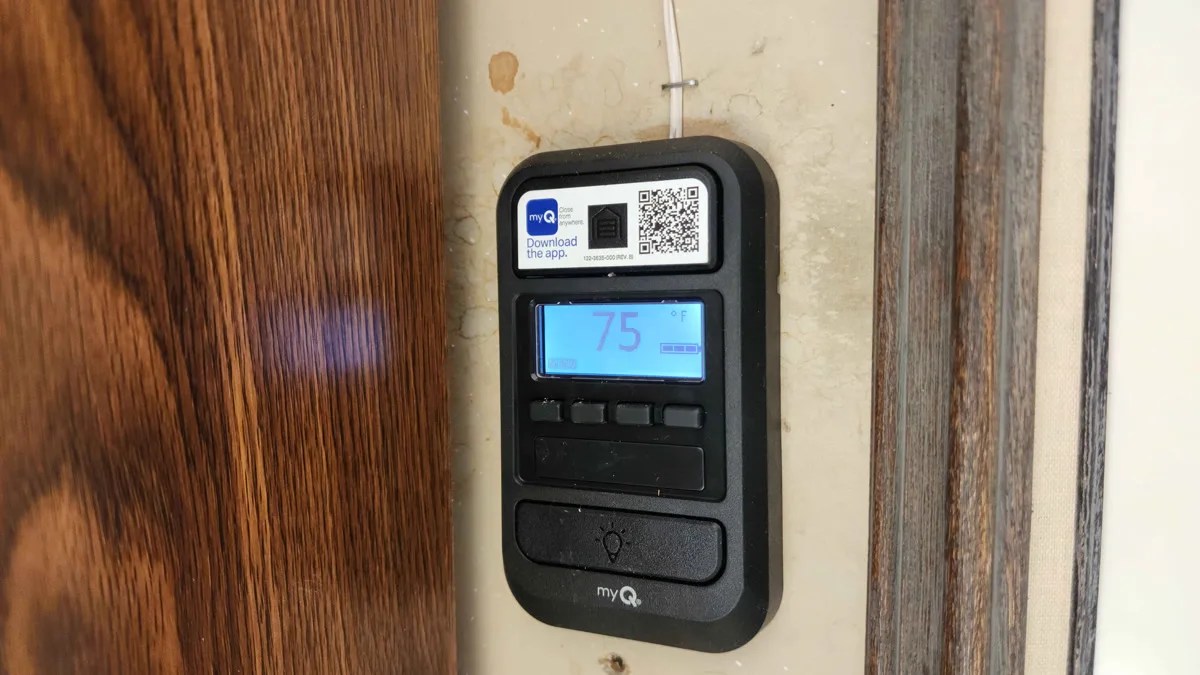
- Press and hold the light button on your wall console for about 5 seconds until the TTC indicator light turns on
- Press the up/down arrow buttons to select your desired close time (1, 5, or 10 minutes, depending on model)
- Press the light button again to confirm your selection
- The TTC indicator light remains on to show the feature is active
To disable: Press and hold the light button for 5 seconds until the TTC indicator turns off.
Pro Tip
On LiftMaster models with myQ, you can control TTC through the app AND through the physical wall console. If you set TTC via the wall console, it overrides the app setting. For the most flexibility, manage TTC through the myQ app instead. For full myQ troubleshooting, see our myQ troubleshooting guide.
Genie (Intellicode)
Models with built-in TTC: Genie models with Aladdin Connect compatibility, including the StealthDrive Connect (7155-TKV), SilentMax Connect (3155-TKV), and ChainMax 1000 (3024-TKV).
Setup steps:
- Locate the program/set button on the back panel of your opener motor unit
- Press and hold for 3 seconds until the indicator LED begins blinking
- Use the up/down buttons to select your close time
- Press the program button to confirm
- The LED blinks in a pattern to confirm TTC is active
Note: Many older Genie models do not have TTC built in. If your Genie opener lacks this feature, the Aladdin Connect smart hub can add auto-close functionality through the app instead. See our Genie troubleshooting guide for more on Genie-specific features.
Craftsman
TTC availability: Limited. Most Craftsman openers manufactured before Sears’ 2018 bankruptcy do not include TTC. Newer Craftsman-branded openers (made by Chamberlain Group) may include it, but availability varies widely by model.
If your Craftsman opener lacks TTC, the most reliable upgrade path is replacing the opener with a LiftMaster or Linear model that includes the feature. For Craftsman-specific help, see our Craftsman troubleshooting guide.
Linear
Models with built-in TTC: Linear LDCO800 and LDCO850 models with GoControl Z-Wave include auto-close capability through smart home integration rather than a built-in hardware timer.
Setup: Linear’s auto-close works through Z-Wave smart home platforms (SmartThings, Home Assistant, Hubitat). You create an automation rule in your smart home hub that closes the door after your specified time. This is technically smart auto-close rather than hardware TTC, but it works reliably when configured properly.
For Linear-specific troubleshooting, see our Linear troubleshooting guide.
Action Step
Not sure which opener you have or whether it supports TTC? Check the label on the side or back of your opener motor unit. For help identifying your opener, see our model number identification guide. If your opener doesn’t support TTC and you want the feature, call Advanced Door at (844) 971-3667 for a free estimate on an opener upgrade.
Smart Auto-Close: myQ, Aladdin Connect, and More
Smart auto-close gives you more control than hardware TTC alone. Instead of a simple countdown timer, smart systems let you set rules, schedules, geofences, and receive notifications, all from your phone.
myQ (LiftMaster and Chamberlain)
myQ is the dominant smart garage platform, used by LiftMaster (professional-grade) and Chamberlain (retail-grade). If you have a Security+ 2.0 opener with WiFi, myQ auto-close is built in.
Auto-close features in myQ:
- Scheduled close: Set specific times for the door to close automatically (example: close at 10 PM every night)
- Timer close: Close automatically after a set number of minutes
- Push notifications: Get alerts when the door opens, closes, or has been open too long
- Remote close: Close the door from anywhere with your phone
- Guest access: Give family members their own myQ access
myQ Limitations:
- Requires WiFi (2.4 GHz only, not 5 GHz)
- Requires active internet connection
- Depends on Chamberlain Group’s cloud servers (occasional outages)
- No native Apple HomeKit, Google Home, or Alexa integration for auto-close (Chamberlain restricted API access in 2023)
- Geofencing requires the myQ app running in the background, which can drain battery
For detailed myQ setup and troubleshooting, see our complete myQ troubleshooting guide.
Aladdin Connect (Genie)
Aladdin Connect is Genie’s smart garage platform. It adds WiFi connectivity and auto-close to compatible Genie openers.
Auto-close features:
- Timer-based auto-close through the app
- Push notifications for door status
- Remote open and close
- Integrates with Alexa and Google Home (unlike myQ)
Aladdin Connect’s open smart home integration gives it an advantage over myQ for homeowners who want auto-close tied to their Alexa or Google routines. However, the platform has a smaller user base and less frequent software updates.
Third-Party Smart Auto-Close Options
If your opener does not support TTC or a native smart platform, several third-party devices can add auto-close capability to almost any garage door opener:
Meross Smart WiFi Garage Door Opener: Works with any wired garage door opener. Connects via WiFi and integrates with Apple HomeKit, Alexa, and Google Home. Supports timer-based auto-close and automations through HomeKit or smart home platforms.
Ratgdo (ESP-based): An open-source device that connects to LiftMaster/Chamberlain openers and provides local control through Home Assistant, MQTT, or ESPHome. No cloud dependency. Popular with smart home enthusiasts who want full local control and auto-close automations without relying on Chamberlain’s servers.
ismartgate: A universal smart garage controller that works with most opener brands. Offers auto-close via app, scheduling, and smart home integration. Compatible with Apple HomeKit, Alexa, Google Home, Samsung SmartThings, and IFTTT.
Pro Tip
If you already have a smart home system like Home Assistant, SmartThings, or Apple HomeKit, check whether your existing setup can add auto-close to your opener before buying a dedicated device. Many smart home platforms can trigger a “close” command through automations and schedules using devices you already own. For a full overview of smart opener options, see our smart garage door opener guide.
Auto-Close Methods Compared
This table compares every auto-close method available to help you choose the right approach for your situation.
| Feature | Built-In TTC | myQ / Aladdin | Third-Party Device | Smart Home Hub |
|---|---|---|---|---|
| Requires Internet | No | Yes | Most require it | Depends on hub |
| Works During Outage | Yes (with power) | No | Usually not | Local hubs: Yes |
| Scheduled Close | No | Yes | Yes | Yes |
| Geofencing | No | Yes | Some | Yes |
| Push Notifications | No | Yes | Yes | Yes |
| Remote Manual Close | No | Yes | Yes | Yes |
| Pre-Close Warning | Yes (UL 325) | App alert only | Varies | Varies |
| Monthly Cost | $0 | $0 | $0 | $0 |
| Setup Difficulty | Easy | Moderate | Moderate | Advanced |
| Best For | Simple reliability | App-based control | Older openers | Full automation |
When Auto-Close Makes Sense (and When It Doesn’t)
Auto-close is not the right choice for every situation. Here is when it works well and when you should think twice.
Auto-Close Is a Great Idea When:
- You frequently forget to close the door. This is the most common reason homeowners want auto-close, and it solves the problem completely.
- You have kids or teens who leave the door open. Children routinely forget to close the garage door after riding bikes, grabbing sports equipment, or heading to a friend’s house.
- You travel frequently. Utah homeowners with vacation homes in Park City, Brian Head, or St. George benefit from knowing the door will always close itself. See our security guide for more vacation protection tips.
- Security is a priority. An open garage door is the number one entry point for residential burglaries. Auto-close eliminates this vulnerability.
- You use the garage as a primary entry. If your garage door is your “front door,” auto-close works like a self-closing entry door.
- You have rental properties. Landlords and property managers can ensure tenants’ garages close automatically, reducing liability. See our rental property guide for more landlord tips.
Think Twice About Auto-Close When:
- You work in the garage with the door open. If you use your garage as a workshop, gym, or hobby space, auto-close can be annoying. You will need to either disable TTC before starting work or set a long enough timer that it doesn’t interrupt you.
- You have pets that go in and out. Dogs and cats that use the garage as shelter or an exit route could be endangered by an automatically closing door, even with photo-eye sensors.
- Your driveway extends through the garage. Some Utah homes have pass-through garages. Auto-close can create hazards if vehicles or people routinely move through the space.
- Your photo-eye sensors are unreliable. If your sensors are frequently misaligned, dirty, or giving false readings, TTC will not work properly. Fix your sensors first before enabling auto-close.
Safety Warning
Never rely on auto-close as a substitute for checking your garage door. Auto-close is a convenience feature, not a safety system. Always verify your garage door is closed before leaving home, especially if children or pets are present. The warning beeps and flashing light may not be audible or visible to someone inside the house with doors closed.
Common Auto-Close Problems and Troubleshooting
Auto-close features generally work reliably, but several common issues can prevent them from functioning properly. This diagnostic table covers the most frequent problems.
| Problem | Likely Cause | Solution |
|---|---|---|
| TTC beeps but door doesn’t close | Photo-eye sensors blocked, misaligned, or dirty | Clean sensors, check alignment. See sensor alignment guide |
| TTC not activating at all | Feature disabled or not properly enabled | Re-enable TTC per brand instructions above. Check wall console indicator light |
| Door closes and immediately reopens | Travel limit misadjusted or obstruction detected | Adjust travel limits. See travel limits guide |
| myQ auto-close stops working | WiFi connection lost or server outage | Check WiFi, restart router, verify myQ hub LED. See myQ troubleshooting |
| TTC resets after power outage | Some openers lose TTC settings without battery backup | Re-enable TTC. Consider battery backup. See battery backup guide |
| Auto-close triggers at wrong time | Timer set too short or scheduled close time incorrect | Adjust timer duration or schedule in app settings |
| Warning beeps but no flashing light | Warning light bulb burned out or socket issue | Replace light bulb. See light bulb guide |
| Sun interfering with sensors, blocking TTC | Direct sunlight overwhelming photo-eye receiver | Add sun shields, swap sender/receiver positions, or relocate sensors slightly |
| Third-party device loses connection to opener | Loose wiring or WiFi signal weakness near opener | Check wiring connections, improve WiFi signal in garage |
| Door partially closes then stops | Spring imbalance, track obstruction, or force settings too low | Check for obstructions, test door balance. See balance test guide |
Action Step
If your auto-close feature isn’t working and you’ve tried the solutions above, the issue may be with the opener’s logic board, wiring, or safety system. Call Advanced Door at (844) 971-3667 for a diagnostic. Our technicians can test your entire safety system and get auto-close working properly.
Auto-Close for Home Security
An open garage door is the most common security vulnerability in residential homes. According to home security studies, an open garage door is used as an entry point in a significant percentage of residential break-ins, particularly during daytime hours when homeowners are at work.
Auto-close eliminates this risk by ensuring your garage door never stays open unattended.
How Auto-Close Improves Security
- Eliminates the “forgot to close it” window. The most dangerous moment for garage security is the gap between leaving and realizing the door is open, often hours later.
- Protects during routine activities. Taking out the trash, checking the mail, or chatting with a neighbor can leave the door open just long enough for an opportunistic theft.
- Covers nighttime forgetfulness. Smart scheduled close (close at 10 PM every night) ensures the door is always shut overnight, even if everyone in the house forgot.
- Vacation protection. For Utah homeowners with second homes, auto-close ensures the garage is always secured even when the property is unoccupied.
Auto-Close Security Best Practices
- Set TTC to 5 minutes or less for everyday use. Ten minutes is too long; a thief can enter, grab, and leave in under 60 seconds.
- Add a smart layer with push notifications so you know every time the door opens or closes.
- Disable the emergency release cord from outside access if possible. Auto-close does not help if someone can pop the door open manually. See our emergency release security guide.
- Lock the garage-to-house door. If someone does enter your garage during the short window before auto-close activates, a locked interior door is your last line of defense.
- Install motion-activated lighting inside and outside the garage to deter entry during the open window.
For a complete security strategy beyond auto-close, see our comprehensive garage door security guide.
Utah-Specific Auto-Close Considerations
Utah’s climate and lifestyle create unique auto-close challenges that homeowners in other states rarely face.
Utah Note
Utah’s extreme temperature range (from below zero in Cache Valley winters to 110+ in St. George summers) means your auto-close system will be tested by conditions most manufacturers don’t design for. The tips below address each challenge.
Winter Cold and Auto-Close
Frozen sensors: Ice, snow, and frost can coat your photo-eye sensors, causing TTC to fail. The sensors think something is blocking the beam and refuse to close. Keep sensors clear during Utah winters, especially after storms. A quick wipe with a dry cloth restores function.
Cold-weather WiFi drops: Garages in Utah can drop below freezing in winter. Some WiFi devices and smart hubs experience connectivity issues in extreme cold, which can disable smart auto-close. A WiFi extender rated for low temperatures helps maintain a reliable signal.
Frozen door sticking: If your garage door seal freezes to the concrete floor, auto-close may trigger but the door could jam partway down. The opener will auto-reverse, and TTC may keep retrying and failing. Breaking the ice seal before enabling TTC in winter prevents this cycle. For frozen door solutions, see our winter garage door problems guide.
Summer Heat and Auto-Close
Sun interference: Utah’s intense summer sun can overwhelm photo-eye sensors, especially on south-facing and west-facing garages. When direct sunlight hits the sensor receiver, it can register a false obstruction and prevent TTC from closing the door. Sun shields (small tubes or hoods over the sensor lens) solve this problem. See our summer heat impact guide for more solutions.
Heat expansion: Extreme heat causes garage door tracks and panels to expand slightly. In rare cases, this can cause the door to bind during auto-close, triggering a reversal. If your door only has TTC issues on extremely hot days (95+ degrees), the door may need a travel limit adjustment.
Dust and Debris
Construction dust (especially in rapidly growing areas like Lehi, Eagle Mountain, Saratoga Springs, and Herriman), agricultural dust (Cache Valley, Tooele), and desert sand (St. George, Cedar City) can coat photo-eye sensor lenses and interfere with TTC. Monthly sensor cleaning is recommended in dusty areas.
Mountain and Rural Properties
Homeowners in mountain communities (Park City, Heber City, Brian Head, Sundance) and rural areas may have weaker or no cellular and WiFi service, making smart auto-close unreliable. For these properties, built-in hardware TTC is the better choice because it requires no internet connection.
Monsoon Season
Utah’s monsoon season (July through September) brings sudden thunderstorms, power surges, and outages. Smart auto-close systems go down when the power or internet goes out. If your garage door is open when a monsoon storm hits and your smart auto-close is offline, the door stays open. Hardware TTC with a battery backup provides the most reliable auto-close during storm season.
Wildlife
An open garage door in Utah invites mice, raccoons, skunks, snakes (especially in southern Utah), and spiders (black widows are common statewide). Auto-close significantly reduces wildlife entry by keeping the open window to just a few minutes. For comprehensive pest prevention, see our pest prevention guide.
Cost Guide: Adding Auto-Close to Your Garage Door
The cost of adding auto-close depends on whether your current opener already has the feature, needs a smart add-on, or requires a full opener replacement.
If Your Opener Already Has TTC Built In
Cost: $0. You just need to enable it. Follow the brand-specific instructions in this guide. Most modern LiftMaster, Chamberlain, and Genie openers manufactured after 2015 include TTC at no additional cost.
If You Need a Smart Add-On
- myQ Smart Garage Hub: $30 to $50 (adds myQ to compatible LiftMaster/Chamberlain openers without built-in WiFi)
- Meross Smart Garage Opener: $35 to $50 (works with any wired opener)
- ismartgate Mini: $80 to $100 (universal, premium smart home integration)
- Ratgdo: $30 to $40 (open-source, local control, no cloud dependency)
- Aladdin Connect Hub: $50 to $80 (for Genie openers)
If You Need a New Opener
If your opener is old enough that it lacks TTC and smart capabilities, replacing it with a modern opener may be the most cost-effective long-term solution. A new LiftMaster or Linear opener installed by Advanced Door includes TTC, smart connectivity, safety sensors, battery backup capability, and a warranty.
For complete opener replacement cost information, see our opener replacement cost guide.
Pro Tip
If your opener is more than 10 to 15 years old, a full replacement is almost always a better investment than adding a smart device to aging hardware. New openers are quieter, more secure, more energy-efficient, and include safety features that older models lack. See our repair vs replace opener guide for the full decision framework.
DIY Setup vs Professional Installation
Auto-close setup ranges from very simple to moderately complex depending on the method.
Safe to Do Yourself
- Enabling built-in TTC: Pressing buttons on your wall console is completely safe and takes 30 seconds.
- Setting up myQ or Aladdin Connect: App-based setup with WiFi pairing. No wiring required for most models.
- Installing a Meross or ismartgate device: Requires connecting two wires to your opener’s wall button terminals. Low voltage (same as your wall button), minimal risk.
- Configuring smart home automations: If you already have a smart home hub, creating auto-close rules is software-only.
Call a Professional
- If you need new sensors installed. TTC requires working photo-eye sensors. If your opener lacks sensors or they are damaged, a professional should install them to ensure UL 325 compliance. See our sensor replacement guide.
- If you want a new opener with TTC. Opener installation involves electrical work, mounting, rail assembly, and safety system testing. See our opener installation guide.
- If your current opener is malfunctioning. Auto-close problems caused by bad logic boards, wiring issues, or motor problems require professional diagnosis. See our opener troubleshooting guide.
- If your door has mechanical issues. Auto-close will not work properly on a door that is off-track, unbalanced, or has worn springs. Fix the door first, then enable auto-close.
For a complete breakdown of which garage door tasks are safe to DIY and which require a pro, see our DIY vs professional guide.
7 Common Auto-Close Mistakes
Avoid these common mistakes when setting up or using garage door auto-close features.
1. Setting the timer too long. A 10-minute timer means your garage sits open for 10 minutes every time you use it. For security purposes, 1 to 5 minutes is more practical. Remember that it only takes seconds for an opportunistic thief to enter and grab something.
2. Relying entirely on smart auto-close without hardware backup. Cloud-based systems fail when your internet goes down, when the manufacturer’s servers have outages, or when your WiFi drops. Always have built-in TTC enabled as a backup if your opener supports it.
3. Ignoring the photo-eye sensors. TTC depends on working sensors. If your sensors are dirty, misaligned, or damaged, TTC will refuse to close the door. This is a safety feature, not a bug. Keep your sensors clean and properly aligned year-round.
4. Not testing the auto-reverse after enabling TTC. Whenever you enable or change auto-close settings, test the auto-reverse by placing a 2×4 flat on the ground under the door. The door should contact the board and reverse immediately. If it doesn’t, do not use auto-close until the safety system is fixed.
5. Assuming auto-close means you never need to check. Auto-close reduces the chance of a door being left open, but it doesn’t eliminate it. Sensor blockages, power outages, frozen seals, and mechanical issues can all prevent auto-close from working. Develop the habit of confirming the door is closed.
6. Not telling family members you enabled TTC. The first time a family member has the garage door close on them unexpectedly, they will be startled and potentially frightened. Make sure everyone in the household knows that TTC is active and understands the warning beeps and lights.
7. Enabling auto-close on a door that needs mechanical repair. If your door is off-track, has broken springs, or is badly unbalanced, auto-close will repeatedly try to close a door that cannot close properly. This can cause additional damage and accelerate wear. Fix the door first, then enable auto-close.
Action Step
Before enabling auto-close, do a quick mechanical check: open the door, disconnect the opener (pull the emergency release), and lift the door manually to about waist height. Let go. A balanced door should stay roughly in place. If it slams down or shoots up, your springs are out of balance and the door needs service before you use auto-close. See our balance test guide for the full procedure.
Get a Free Estimate from Advanced Door
Want auto-close on your garage door? We install LiftMaster and Linear openers with built-in timer-to-close.
Serving Ogden, Salt Lake City, Provo, Park City, Logan, and all of Utah
Call for a free estimate. No pressure, no hidden fees.
Current offers: $100 off any new door or 10% off any service call
(Offers cannot be combined)
Frequently Asked Questions
Can I add auto-close to my existing garage door opener?
It depends on your opener. Many modern openers manufactured after 2015 already have timer-to-close built in – you just need to enable it. If your opener doesn’t have TTC built in, you can add smart auto-close with a device like Meross, ismartgate, or Ratgdo for $30 to $100. If your opener is very old and lacks even basic smart compatibility, replacing the opener may be the most practical option.
Is garage door auto-close safe?
Yes, when properly set up. UL 325 safety standards require that auto-close openers have working photo-eye sensors, audible and visual warnings before closing, and active auto-reverse during closing. These redundant safety systems prevent injury. However, auto-close should never be used on a door with malfunctioning sensors, and all family members should know the feature is active.
Why does my timer-to-close beep but not close the door?
The most common cause is blocked or misaligned photo-eye sensors. TTC will not close the door if the sensors detect an obstruction or if the sensor beam is broken. Clean the sensor lenses, check alignment, and make sure nothing (including cobwebs, dirt, or direct sunlight) is interfering with the beam.
Can I set different auto-close times for different situations?
With hardware TTC alone, you get one fixed timer setting (typically 1, 5, or 10 minutes). With smart auto-close (myQ, Aladdin Connect, or smart home platforms), you can set different close times for different situations, schedules, or geofencing rules. Using both together gives you the most flexibility.
Will auto-close work during a power outage?
Hardware TTC will not work if the power is out (the opener needs electricity to operate). However, if your opener has a battery backup, TTC will continue to function on battery power. Smart auto-close depends on both power and internet, so it fails during outages unless you have backup power for your opener, router, and smart hub.
Does auto-close void my opener warranty?
No. Timer-to-close is a manufacturer-designed feature built into the opener. Enabling it does not affect your warranty. Third-party smart devices like Meross or Ratgdo also do not void your opener warranty because they connect to the same low-voltage wall button terminals that your existing wall button uses. For more on warranty protection, see our warranty guide.
How do I stop auto-close temporarily without disabling it?
Most openers let you “cancel” a TTC cycle by pressing the wall button or remote during the warning phase (beeping/flashing). The door stays open and the timer resets. On LiftMaster/Chamberlain models, pressing any button during the countdown cancels that cycle. The door will start a new countdown the next time you open it.
What happens if my WiFi goes down and I only use smart auto-close?
If your WiFi goes down and you rely only on cloud-based smart auto-close (myQ, Aladdin Connect, etc.), auto-close will not work until the internet connection is restored. This is why we recommend enabling built-in hardware TTC as a fail-safe backup. Local smart home hubs (Home Assistant, Hubitat) running on your home network may continue to function during internet outages if configured for local control.